
OK, so this is gonna get wordy
My intended holiday projects failed due to partially recognised hardware (replacement part has been ordered) and having no vehicle -due to a failed MOT work in progress, ‘stress mode’ was and is still activated.
So I decided to look for distractions, things like going out with a friend -ending up at a carboot of all places and buying a Netgear ReadyNAS NV+ for £1, this was electronically ‘fubar’ but has the hot swap cages and the case is OK, so I pulled the electronics and disposed of them and cleaned the case because, future ideas.
During the week my son mentioned (again) that sometimes during games he would drop out, seemingly with no reason, this is part of the reason I want to try out Sophos Firewall Home Edition as it has many tools by default that other firewalls have to add via packages and hassle.
I started to look at other reasons it may be dropping out, with nothing in the logs. My investigations led me to WiFi (makes a change to DNS)
I have a 802.11s Mesh Network of 3 routers that run OpenWRT, the mesh network, along with my primary WiFi SSID all sat within the 36-48 channel range of the 5Ghz band (I probably should have gone wifi7 / 6ghz but… hindsight)
The following details is based upon the conclusions I have made in relation to the regulatory requirements of UK WiFi as set out by OFCOM (yes that OFCOM)
A WiFi channel is a 20Mhz slice of pie, most routers should allow you to set 20Mhz and 40Mhz blocks, other routers will enable to you set 80Mhz and even 160Mhz blocks of channels for better bandwidth
Channels 36-48 (Band A) in the 5Ghz spectrum in the UK are open for indoor WiFi use, without any DFS or licensing requirements. This is why its sooo congested and because of how WiFi works collisions and reattempts can be rife, causing a slowdown as AP’s and clients wait their turn.
Channels 52 – 64 (Band A) are subject to DFS (Dynamic Frequency Selection) requirements which limit WiFi use to protect the functionality of Military, Civil and Meteorological radar
In ‘Band A’ 80Mhz bandwidth capable routers will cover 4 channels starting at the one selected within the router and subsequently can be affected by DFS
In ‘Band A’ 160mhz bandwidth capable routers typically centre on Channel 50 and covers channels 36 – 64 and as such can be affected by DFS
Channels 68 – 96 are technically “not available” for use by WiFi
Channels 100 – 140 (Band B) can be used by WiFi are subject to more ‘aggressive’ DFS but can be used indoors and outdoors. I note that many folks and ISP’s select this range as it appears uncluttered, however if you find yourself loosing WiFi for 10 minutes or so at a time- it may be your router scanning for Radar (yes really)
Up until 2020 Channels 149 – 161 was reserved for high power WiFi transmission and required a licence from OFCOM to use (which you had to pay for)
However I spotted this information in a consultation white paper located here
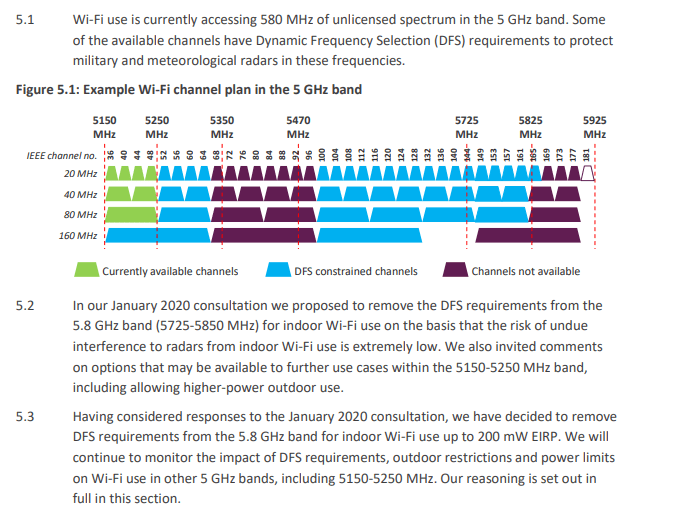
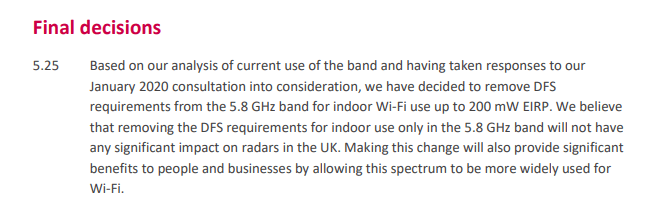
Channels 149 – 161 can now be used for low power ( <200mW) indoor WiFi connectivity without the need for a licence or activating DFS on the device, this makes it perfect for a Mesh Network and modern devices but not so good for streaming or older devices that may be stuck using Channel A on 5Ghz
Which brings me back to my hopeful fix to the gaming drops.
I have now changed my Mesh Network to 199mW (23Db) and moved all 3 “mesh-points” to channel 149 at 80Mhz bandwidth, my network is (at the moment) the only one currently residing there, the last few BufferBloat tests have come back as A+ so all seems good.
However there is an unavoidable drawback. The Wireless Access point also operates at the same channels ..
Older WiFi devices (by design) cant operate on channel 149, so they immediately loose connectivity… unless..
Your router will most likely have 2 or 3 radios (2.4Ghz, 5 Ghz and possibly 6Ghz or a 2nd 2.4Ghz or 5Ghz)
Mine has both 5Ghz and 2.4Mhz radios, for any devices that cant operate in the clouds of WiFi channels they now connect the 2.4Ghz station instead. As time goes onward new devices I buy should hopefully allow connectivity to my 5Ghz network
So if I face any issues with this set up I will post back here.
I am also expecting delivery of a i210at network card that should hopefully enable me to finally try out Sophos Firewall Home Edition